
Gun Escape Controls
Where the fire button lives, and why jump is not your movement key.
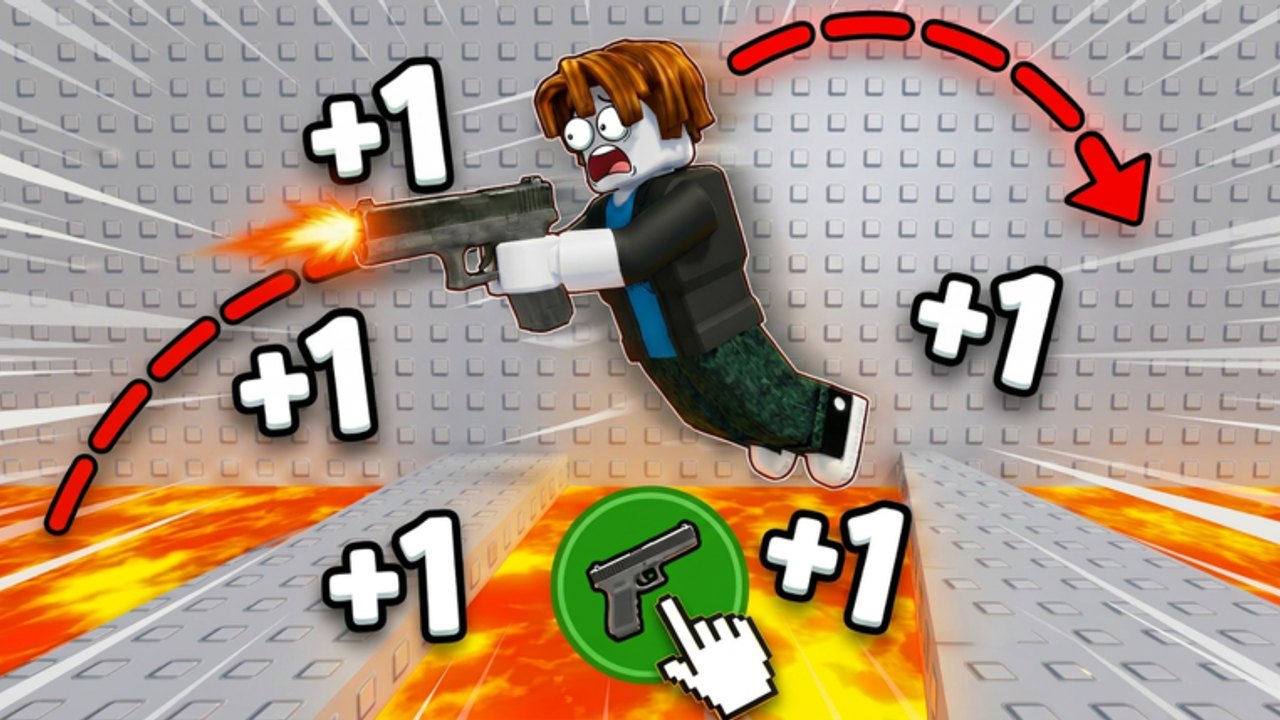
Read this if the gun will not shoot
Gun Escape uses a Roblox tool plus a HUD button. Official lava-corridor art puts a green circle with a pistol in the lower center and a white hand clicking it. If you only tap jump, you will hop in place like every other obby and never trigger knockback.
Equip the weapon first. Then fire. Movement is the recoil of that fire.
PC
| Action | Default |
|---|---|
| Move | WASD |
| Camera | Mouse |
| Fire / knockback | Left click (tool equipped) |
| Jump (fine-tune) | Space |
| Shift lock | Left Shift if you enabled it — optional |
| Open shop / codes | On-screen buttons, not a keyboard bind |
Click once per pad. Holding LMB is how FPS players drain a mag. Here it is how you crack the cube you are standing on.
Chat ( / ) will eat Enter. Close chat before you try to confirm a code.
Mobile
| Action | Control |
|---|---|
| Move | Left joystick |
| Camera | Drag on the right |
| Fire / knockback | Green gun HUD button |
| Jump | Jump button — use sparingly |
Landscape mode. The fire button is large on purpose; in portrait it covers the next platform so you cannot aim. If your thumb rests on jump, you will add a vertical twitch to every shot and overshoot.
Paste codes before a run. The on-screen keyboard plus the fire HUD is a mess mid-flight.
Console
Standard Roblox: left stick move, right stick camera, trigger or bumper to fire if the tool maps that way. If fire does nothing, open the on-screen Roblox menu and check that the experience is not capturing the trigger for UI. Some incrementals only expose the HUD button — in that case, move the virtual cursor onto the green circle.
Codes on console are painful. Redeem on mobile with the same account, then hop back. See how to redeem.
What not to bind
You do not need a 12-key claw for this game. Auto-click macros are how people crack every tutorial pad and then write “broken map” in chat. The scripts safety page covers why we will not help you bind a turbo fire.
Shift lock is optional. It can help you keep the muzzle pointed down-forward. It can also make camera recovery worse after a shotgun blast. Try ten hops each way.
Aim, not sensitivity
The skill is angle, not 800 DPI. Promo arcs are rainbows that start at your feet and end on the next cube. Point the barrel at the top of the next pad or slightly below. Pointing at the horizon is a sky shot. Pointing straight down is a self-crack.
After a shotgun buy, lower your aim. More knockback, same pad spacing, means a flatter shot. This is the entire how to play lesson expressed as a camera note.
HUD clutter
The live client may add shop, inventory, codes, and like-reminder buttons around the fire circle. None of those move you. If you fat-finger Shop mid-jump, you will die in a menu. On mobile, use Roblox’s HUD opacity / scale if your build exposes it.
The like-and-join reminder is useful once. Claim it via group rewards, then ignore the badge.
Accessibility
- One-handed mobile: put the device on a table, joystick with left, tap fire with right. Do not try to claw jump+fire until you can land three cubes.
- Color: lava is orange, pads are green, HUD fire is green. If those collide for you, listen for the muzzle and watch the +1 text instead of the floor color.
- Motion: shotgun knockback is violent. If you get camera sick, lower camera shake in Roblox settings if available, and take shorter sessions.
Practice drill (two minutes)
- Stand on a safe cube.
- Fire with no jump. Note the distance.
- Fire with a tap-jump. Note the extra height.
- Pick the input that actually hits cube two.
- Repeat after every shop upgrade.
Log that drill on the progress checklist. Controls do not stay learned when the gun changes.
Related
- How to play — physics
- Mobile — thumbs, landscape, cracked double-taps
- Beat levels — when the floor is lava
- Getting started — first session order
If the gun shoots and you still fall, that is aim, not a missing keybind. Go back to how to play instead of rebinding Space to twelve things.
Frequently Asked Questions
Quick answers for Gun Escape on Roblox.
What button makes me fly?
Fire. Jump only tweaks the arc. The green HUD circle is the real movement key.
Why does nothing happen when I click?
The tool is not equipped, or you are tapping jump. Equip the pistol or shotgun, then use fire.
Can I use a controller?
Yes, through normal Roblox mapping. If fire is HUD-only, cursor onto the green circle.
Should I use an auto-clicker?
No. Double-firing cracks pads and looks like a script to a report. Read scripts safety.